STEP 2-3
Trial policy settings
Configure the trial period and the payment-related settings.
Go to Settings > Purchase options > Try Before You Buy > Trial policy
Configure the following and click Save at the top right (configure the optional items only if you need them)
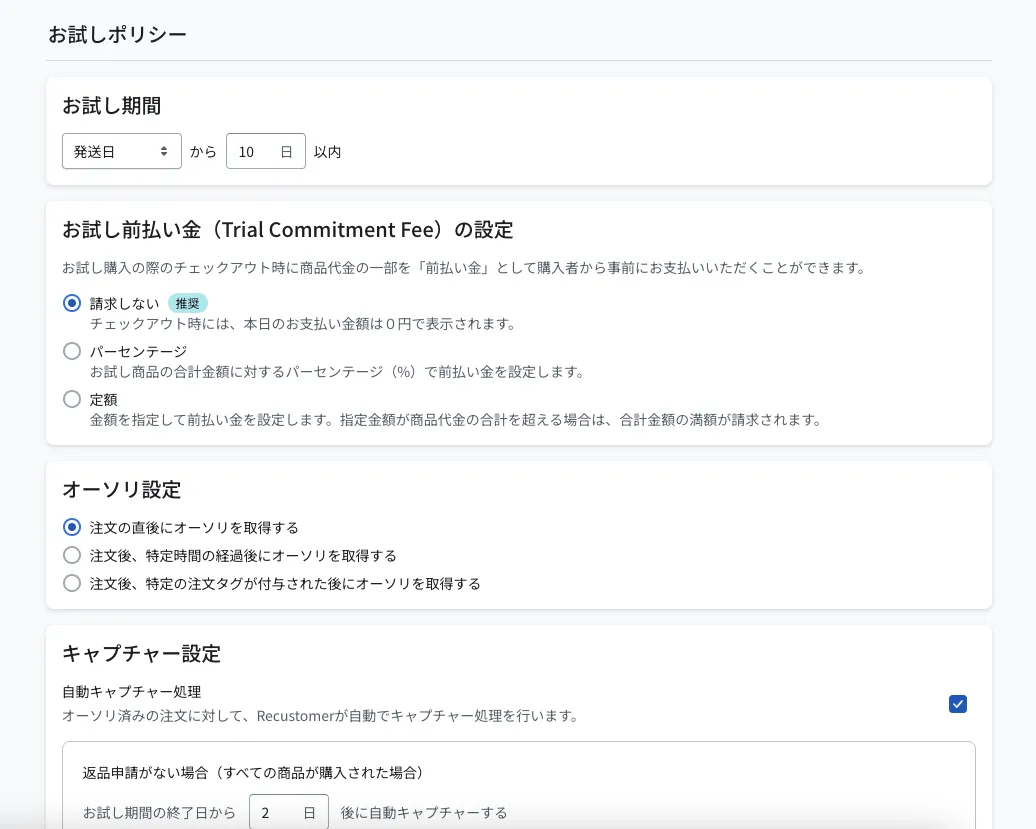
| Setting | Required | Description |
|---|---|---|
| Trial period | Required | If a return is requested within this period, the shopper is not charged for the trial items. You can choose whether the period starts from the delivery date, the shipping date, or the order date. ※If you do not have a contract for Tracking, you cannot use the delivery date as the start. Choose either the shipping date or the order date. ※When the delivery date is used, the carrier occasionally does not record the delivery status. In that case, the trial period starts 10 days after the order. |
| Trial Commitment Fee settings | Optional | You can collect part of the item price from the shopper up front, as a prepayment, at checkout for a trial purchase. ※This requires an additional Shopify Flow. For details, see Additional setup for trial prepayments. |
| Authorization settings | Optional | You can set when the authorization (the hold on the available credit) is obtained. Example use If you wait for the result of an external fraud screening tool, we recommend setting a matching delay or branching on an order tag. |
| Capture settings | Optional | You can set whether to capture (confirm payment) automatically when every item is purchased, and how many days later the automatic capture runs. Example use If you want payment confirmed automatically after the trial period ends, turn automatic capture on and specify the number of days until confirmation (setting 0 days captures immediately). If you want to capture manually, choose automatic capture off and capture the trial order manually from the order management screen. |
© Recustomer, Inc.