STEP 2 extra
Showing trial items as ¥0 on the cart page
Trial items are only shown as ¥0 on the checkout page. They are not ¥0 on the cart page.
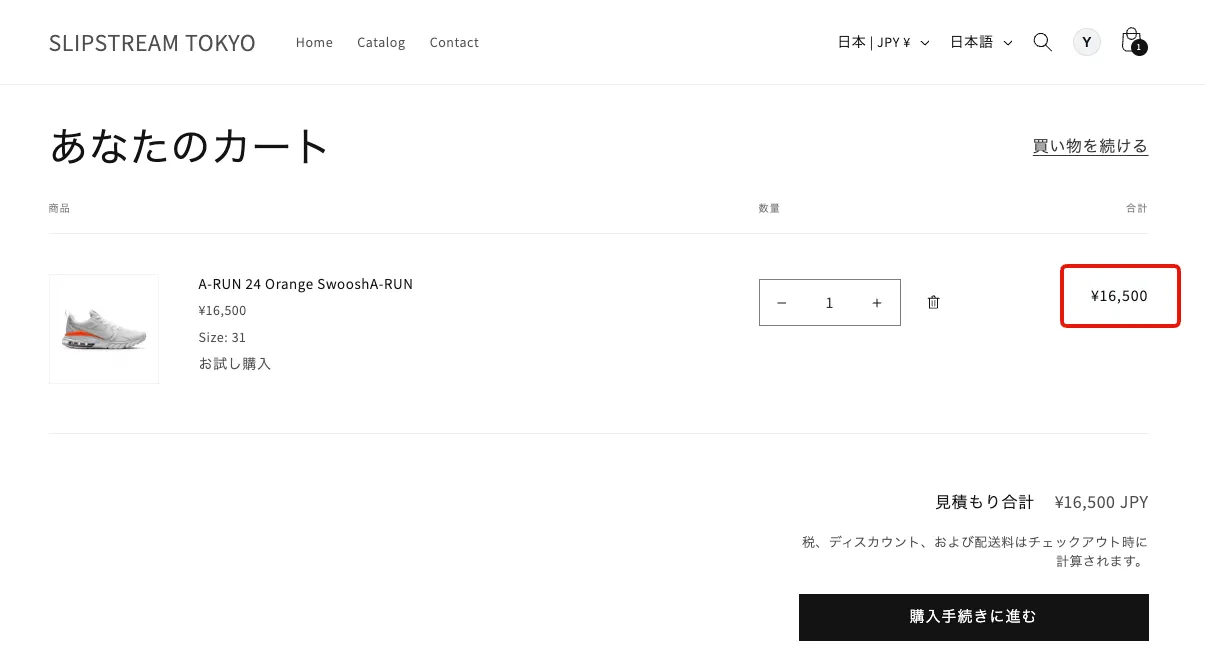
If you want them shown as ¥0 on the cart page too, you can handle it with a customization on the storefront (theme) side.
Adding the Liquid code below to your cart page template totals up the trial items in the cart into a trial_total variable. Subtracting that value where the cart total is displayed lets you show the trial items as ¥0.
{%- comment -%}
  Totals up the trial items in the cart into trial_total.
  Whether an item is a trial purchase is determined by the app_id of the purchase options group (recustomer_tbyb).
{%- endcomment -%}
{%- assign trial_total = 0 -%}
{%- for item in cart.items -%}
  {%- if item.selling_plan_allocation -%}
    {%- for group in item.product.selling_plan_groups -%}
      {%- if group.app_id == "recustomer_tbyb" and group.id == item.selling_plan_allocation.selling_plan_group_id -%}
        {%- assign trial_total = trial_total | plus: item.final_line_price -%}
        {%- break -%}
      {%- endif -%}
    {%- endfor -%}
  {%- endif -%}
{%- endfor -%}
※The above is a sample implementation. How it is wired in depends on your theme, so please verify the behaviour when you implement it
© Recustomer, Inc.