Troubleshooting
Frequently asked questions about Try Before You Buy, grouped by topic.
Frequently asked questions
Orders and statuses
Trial period and payment timing
Authorization
- What does re-authorization failed mean?
- Why does an order with a return request still get the re-authorization succeeded email?
- A shopper says they have been charged several times, or charged twice
- When is the money taken from the account if the shopper pays with a debit card?
- What happens to a trial order if there is a problem with the card?
- What should I do when an order whose payment was confirmed after a re-authorization failure has a return?
Conditions at the time of the order
Day-to-day operation
- Things to be careful about while running Try Before You Buy
- A shopper wants to change their order before it ships. Can I edit the order in Shopify?
- I want to cancel a return request for a trial item, or switch between return and exchange
- What happens to the payment if I reject an item or mark it as past the return deadline?
How do I read a trial order and what do the statuses mean?
You can see everything in Order management in Recustomer.
Trial orders are managed in one place, in Recustomer's Order management. The Trial status column in the list shows which stage each order is at.
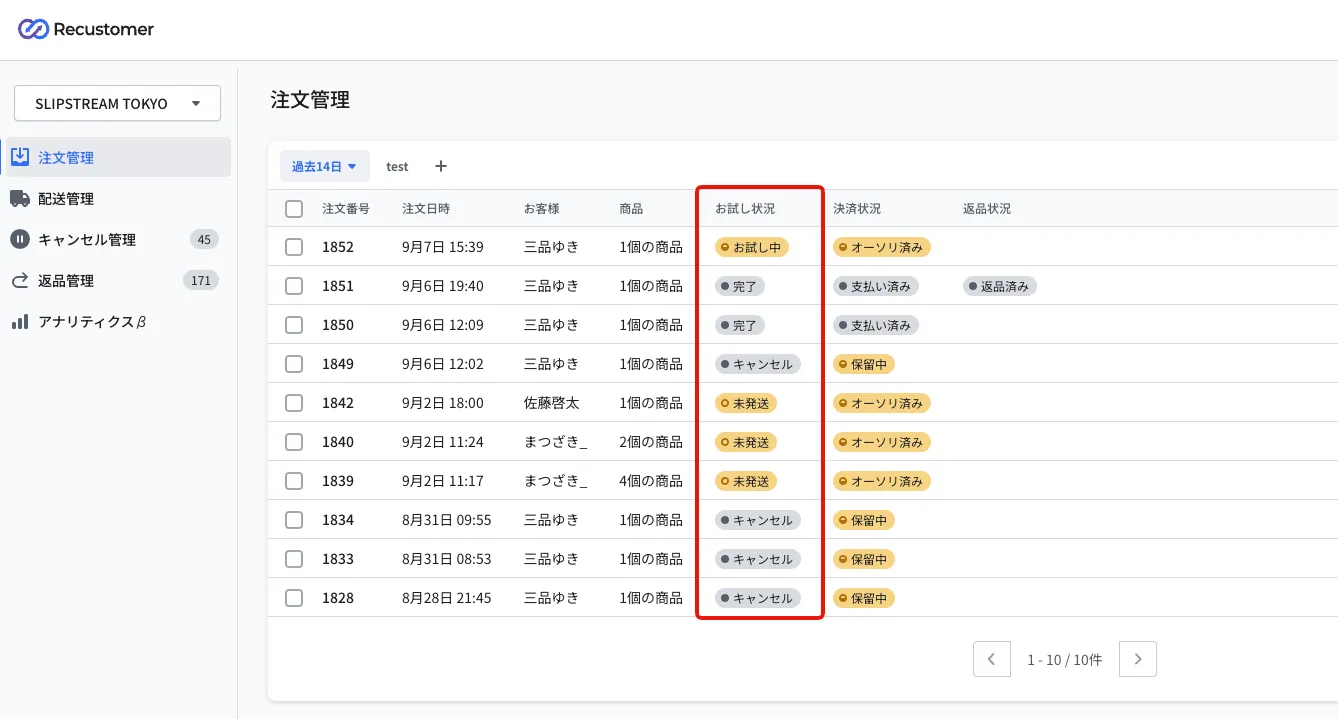
| Trial status | Shopify payment status | Meaning |
|---|---|---|
| Not authorized | Payment pending | The authorization (the hold on the available credit) has not been obtained yet |
| Unfulfilled | Authorized | The authorization is done and the items have not shipped yet |
| In trial | Authorized | The shopper is trying the items. Returns can be requested and payment can be confirmed during the trial period |
| Completed | Paid | The capture (payment confirmation) is done |
| Cancelled | Payment pending / Voided / Refunded | The order has been cancelled |
Clicking an order opens the detail screen, where you can check and do the following.
The Capture payment button: confirms payment without waiting for the trial period to end (see Can I confirm payment before the trial period ends?)
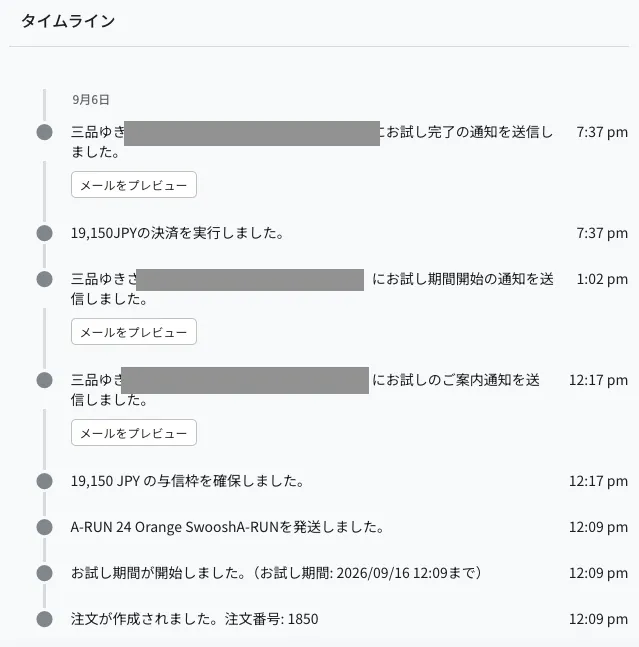
The timeline: shows when the trial period started and ended, when credit was held and payment was taken, and the history of the trial notification emails, in chronological order
What is the flow of a trial order up to the confirmed purchase?
If nothing is returned, you do not need to do anything: payment is taken automatically after the trial period ends. Here is the flow when something is returned, when nothing is returned, and when the order is cancelled.
If nothing was returned
Nothing to do in the admin dashboard.
When the trial period ends, the authorization that is being held is captured (payment confirmed) automatically and the trial status becomes "Completed".
The timing of the payment is decided by the capture settings in Trial policy settings.
If something was returned
If the return request was created as "Not approved", open it and set it to "Approved" from Process the approval (not needed if you approve automatically)
When the items arrive back, set them to Received from Process the return
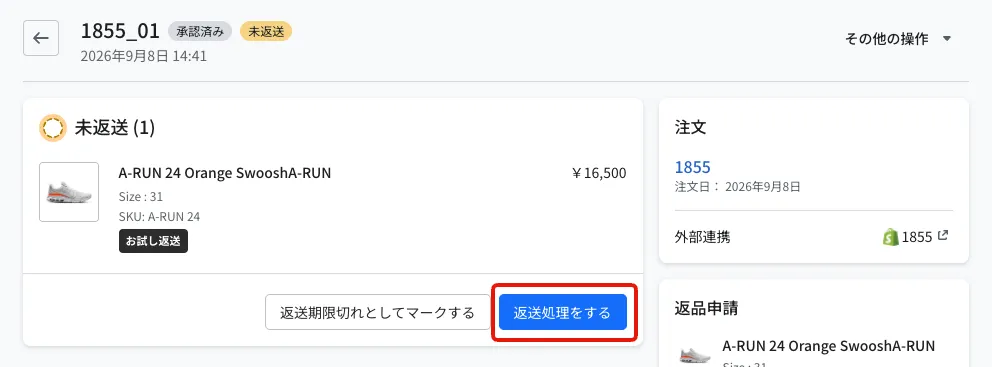
When the trial period ends, payment is taken automatically for the amount less the items you marked as received
If there was an exchange
If the return request was created as "Not approved", set it to "Approved" from Process the approval
When the items arrive back, set them to Received from Process the return
Mark the exchange items as fulfilled on the Shopify side
Open the return request in Recustomer and set it to "Exchanged" from Mark as exchanged. The shopper is notified that the exchange items have shipped
When the trial period ends, payment is taken for the amount of the original trial order. With an exchange, the amount of the returned items is not deducted: payment is confirmed as if the shopper had bought the exchanged items
※The exchanged items can also be submitted as a regular return, as long as it is within the return window
If the order was cancelled
Orders cancelled before shipping get the trial status "Cancelled".
Orders whose first authorization fails are cancelled automatically (see What happens to a trial order if there is a problem with the card?).
What do the expiry and due dates shown in the Shopify admin mean?
Both are shown automatically by Shopify for deferred orders. They are separate from the Recustomer trial deadline.
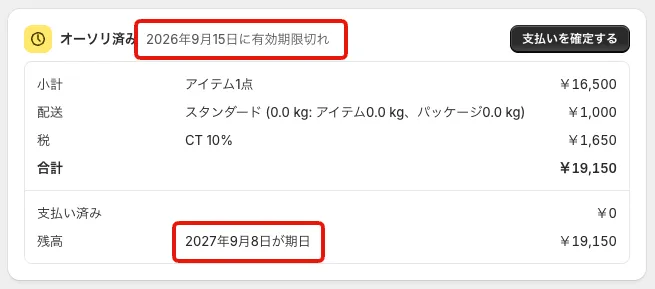
| What is shown | Meaning | What to do |
|---|---|---|
| "Expires on ..." | The expiry of the authorization (the credit hold) | Recustomer re-authorizes automatically before it expires and extends it. Nothing to do |
| "... due" | A guide to when the balance is collected, as shown in the Shopify admin. It is an internal management date and does not affect when payment is actually taken | You can ignore it |
A trial order was cancelled automatically
This happens when the authorization at the time of the order fails.
After an order is imported, Recustomer runs an authorization (a hold on the card's credit limit). If it fails, for example because the card is over its limit or has expired, the order is cancelled automatically (see If it fails at the time of the order).
These are the typical times until the order is cancelled.
| Cancelled in | Time after the authorization failure is detected |
|---|---|
| Shopify | Up to about 10 minutes |
| OMS (NextEngine, CROSSMALL) | About 15 to 25 minutes (Recustomer waits for the order to be imported into your OMS before cancelling it) |
When the order is cancelled in Shopify, Shopify automatically sends the shopper an order cancellation email. Recustomer does not send the shopper an email explaining the reason for the cancellation.
The order is cancelled in your OMS only if you configured both a main and a sub integration in Cancellation settings.
When does a trial deadline of X days from the shipping date start and end?
It runs until exactly the same time of day, X × 24 hours after the time of shipping. It is judged down to the time of day, not just the date.
Example: the trial period is set to 7 days from the shipping date, and the order ships on 1 July at 12:00 → The trial deadline is 8 July at 12:00
Note that it is not "seven days counted from the day after shipping (through the end of 8 July)". We recommend explaining it on the same basis in your store FAQ and guidance, so that it matches the deadline shoppers are told.
Why is there a gap between the end of the trial period and the payment being confirmed?
Because the capture settings in Trial policy settings specify how many days after the end of the trial period the automatic capture runs. The default is 2 days.
- If you want payment confirmed as soon as the trial period ends, change it to 0 days
- Orders with a return request count the days in the same way. However, while any item is still waiting to be returned, the payment is put on hold and is confirmed after the item is marked as received (see When is payment confirmed for an order with a return or exchange request?)
When is payment confirmed for an order with a return or exchange request?
After the trial period ends and no items are still waiting to be returned.
If an order has a Trial return or Trial exchange request and the items are still "Not returned", the payment stays on hold even after the trial period (including the days in the capture settings) ends. Once you mark the returned items as received, the payment is confirmed by the next automatic run. However, if a re-authorization fails during the trial period, the payment is confirmed at that point even if some items are still "Not returned" (see What should I do when an order whose payment was confirmed after a re-authorization failure has a return?).
| Situation | When payment is confirmed | Amount confirmed |
|---|---|---|
| No return or exchange | After the number of days in the capture settings has passed since the trial period ended | The order amount |
| Trial return | After that point, once all returned items are marked as received | The amount less the items marked as received |
| Trial exchange | After that point, once all returned items are marked as received | The original order amount (the returned items are not deducted) |
Even if you mark items as received before the trial period ends, the payment is confirmed only after the trial period ends.
Payment is not confirmed while items remain Not returned
If the shopper does not send the items back, open the return request and run Mark as past the return deadline. Those items go back into the payment, and the payment is confirmed automatically (see What happens to the payment if I reject an item or mark it as past the return deadline?).
Can I confirm payment before the trial period ends?
Yes, you can confirm payment manually from the admin dashboard.
Use this when, for example, a shopper tells you they will keep everything and you do not want to wait for the trial period to end.
Open the order in order management
Click the Capture payment button in the transaction details
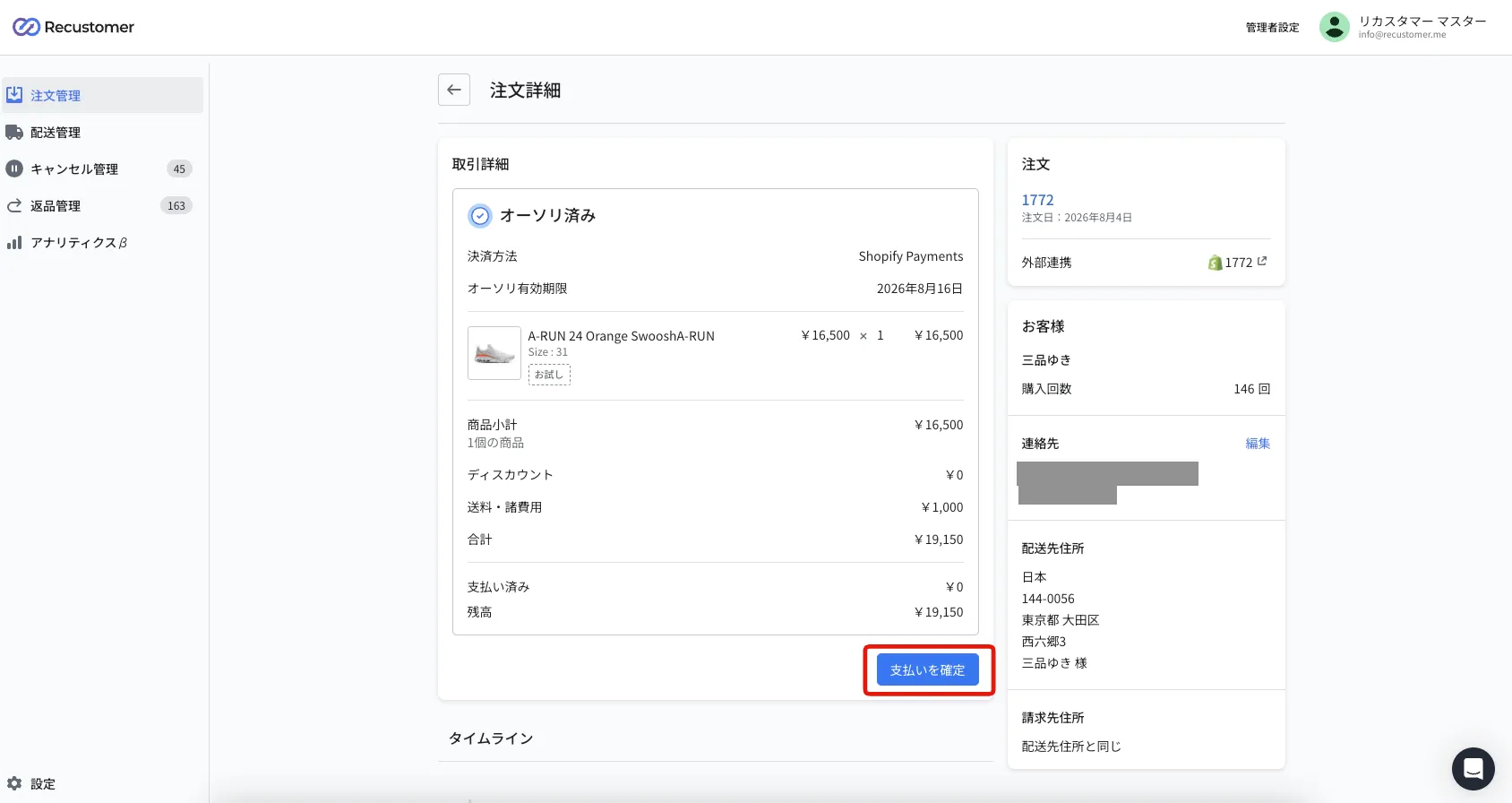
Clicking Capture payment forces the capture (payment confirmation) at that point. If a return request has items marked as received, their amount is deducted.
Note
A capture cannot be undone. Check that the items due to be returned are marked as received before you run it.
What does re-authorization failed mean?
It means the re-authorization (obtaining a new credit hold) that Recustomer performs during the trial period did not succeed on the shopper's card.
Authorizations (credit holds) expire, so Recustomer automatically obtains a new hold for orders where 5 days have passed since the last successful authorization (for the terminology, see 1. What is Try Before You Buy?). "Re-authorization failed" is when a new hold could not be obtained — because the card is over its limit, has expired, or has been suspended.
When re-authorization fails, to avoid losing the payment, Recustomer captures the payment using the hold it already has before that hold expires. The charge is confirmed even in the middle of the trial period, and the trial status becomes "Completed". If items are returned after payment has been confirmed, refund them on the Shopify side.
The result of the re-authorization is sent to the shopper by email. You can edit the wording in Notification emails.
| Notification email | When it is sent |
|---|---|
| Re-authorization succeeded | When the re-authorization succeeds |
| Re-authorization failed | When the re-authorization fails and payment is confirmed at that point |
Why does an order with a return request still get the re-authorization succeeded email?
Because re-authorization continues until the trial period ends, even after a return request has been created. When re-authorization succeeds on an order whose return is in progress, the shopper receives the "re-authorization succeeded (return in progress)" email. With a long trial period, it is sent more than once.
You can edit the wording in Notification emails.
A shopper says they have been charged several times, or charged twice
In most cases nothing has actually been charged. What the shopper is seeing is the authorization (credit hold) on their statement.
During the trial period, Recustomer only places authorizations on the shopper's card. The payment (capture) is made once, after the trial period ends. Because authorizations expire, Recustomer obtains a new hold every 5 days during the trial (see What does re-authorization failed mean?).
Card issuer apps and provisional statements may show these repeated holds as:
- Several "charges" or "approved" entries for the same amount
- Entries marked "pending" or "provisional"
- Alternating "debit" and "credit (refund)" entries — mainly with debit cards (see When is the money taken from the account if the shopper pays with a debit card?)
This is how the card issuer displays holds. The only amount that is finally charged is the amount confirmed after the trial period ends. You can check the confirmed amount in the transaction details of the order in Recustomer's order management.
Please explain the following to the shopper:
- The entries on the statement are credit holds (temporary reservations), not confirmed charges
- The charge is confirmed after the trial period ends, for the amount minus any returned items
- When the entries appear on the statement and when the holds are released depends on the card issuer's closing date and billing cycle, so they should ask the card issuer for details
Recustomer can only show the history of authorizations and captures it has performed. It cannot see the card issuer's statement or the effect on the shopper's account balance.
When is the money taken from the account if the shopper pays with a debit card?
Depending on the card issuer, the money may be taken from the account at the time of authorization and refunded when the hold is released.
Recustomer handles debit cards exactly like credit cards: only authorizations during the trial period, and a single capture after the trial period ends. However, many debit cards take the money from the account immediately when a hold is placed. In that case, the shopper sees the following:
| Timing | What Recustomer does | What happens in the shopper's account (depends on the issuer) |
|---|---|---|
| At order | Authorization | The order amount is taken from the account |
| During the trial (every 5 days) | Re-authorization | The previous amount is refunded and the same amount is taken again |
| After the trial ends | Capture | Only the confirmed amount (minus returned items) is finally taken |
| All items returned | Capture of shipping and other fees only (hold released if there are none) | The item amount is refunded; if there are shipping or other fees, only that amount is finally taken |
Refunds can take from a few days to a few weeks to appear, so several debits may temporarily remain visible in the account during that time. The shopper is never charged more than the confirmed amount in the end.
Because the timing of debits and refunds differs by card issuer, please ask the shopper to check with their card issuer.
What happens to a trial order if there is a problem with the card?
Depending on when it fails, the order is either cancelled automatically or the payment is confirmed.
If the authorization (the credit hold) fails because the card is over its limit, has expired, and so on, the behaviour depends on when the failure happens (for the terminology, see 1. What is Try Before You Buy?).
If it fails at the time of the order
The order is cancelled automatically.
The card authorization runs after the order is imported. If it fails because the card is over its limit, has expired, and so on, the order is cancelled automatically.
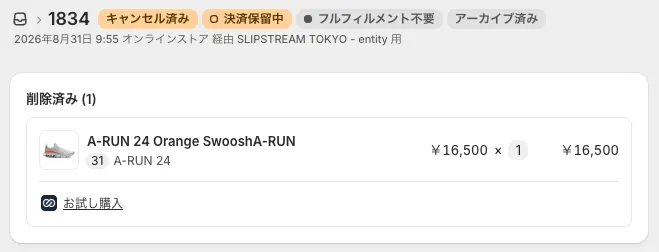
- When an order is cancelled, Shopify sends the shopper an order cancellation email (Recustomer does not send the shopper an email explaining the reason)
- If you configured both a main and a sub integration in Cancellation settings, the cancellation runs against the order in your OMS as well as the one in Shopify
If it fails between the order and the end of the trial
Payment is confirmed at that point, even in the middle of the trial period.
During the trial period, re-authorization (obtaining a new credit hold) runs regularly so that the hold does not expire. If a re-authorization fails, to avoid losing the payment, the capture is made using the hold obtained previously (see What does re-authorization failed mean?). The shopper receives the "re-authorization failed" email.
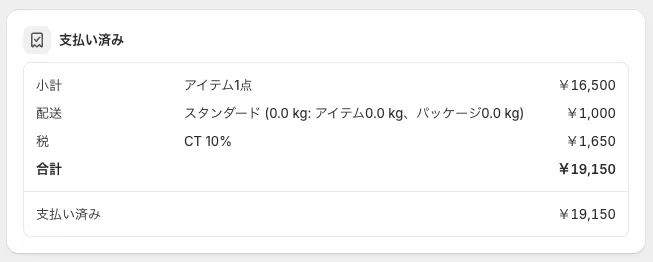
※If items are returned after payment has been confirmed, you need to refund them manually on the Shopify side (see What should I do when an order whose payment was confirmed after a re-authorization failure has a return?)
Which payment methods can be used with Try Before You Buy?
Only Shopify Payments is supported.
Authorizations and captures for Try Before You Buy go through Shopify Payments, so other payment providers, deferred payment, cash on delivery, and similar methods cannot be used with Try Before You Buy.
Please tell shoppers that credit and debit cards are the payment methods available with Try Before You Buy.
Do sale prices and coupons also apply to Try Before You Buy?
Yes, they apply.
Discounts from limited-time sales and coupons apply to trial items just as they do to regular items. There is no way to restrict coupon use on the Recustomer side.
If only some items are sent back, the discount is apportioned per item. The items the shopper keeps are charged at their discounted price, and the discount on the returned items simply goes unused (no refund or additional charge is made).
Can a shopper order trial items and regular items in the same cart?
Yes, trial items and regular items can be placed in a single order.
In that case, the Shopify payment status becomes "Partially paid" (the regular items are paid and the trial items are authorized). For how this maps to the payment status, see the table in How do I read a trial order and what do the statuses mean?.
Recustomer cannot prevent trial items and regular items from being added to the same cart. If you want shoppers to order them separately, that has to be implemented on the Shopify theme (cart page) side.
Can an item ordered as a regular purchase be changed to a trial purchase afterwards?
No. A regular purchase cannot be switched to a trial purchase after the order is placed, and neither can the reverse.
Whether an order is a trial purchase is fixed at the time of the order, so a regular purchase cannot be changed to a trial purchase later. If a shopper tells you they meant to use Try Before You Buy but added the item as a regular purchase, ask them to cancel that order and place it again through Try Before You Buy.
Likewise, an item ordered through Try Before You Buy cannot be changed to a regular purchase afterwards. If a shopper decides to buy it without trying it, confirm the payment manually from the admin dashboard (see Can I confirm payment before the trial period ends?).
Things to be careful about while running Try Before You Buy
Do not take payments, issue refunds, create returns, or edit orders in the Shopify admin until the trial status is "Completed".
Here is what you must not do when using Try Before You Buy with the Shopify integration.
Note for day-to-day operation
From the moment a trial order is created until its trial status is "Completed", do not perform any operation in the Shopify admin that affects the amount charged.
If you do (creating a return, issuing a refund, editing items, and so on), Recustomer's automated processing — obtaining authorizations, syncing returns, and judging the trial deadline — does not work correctly, which causes errors and double processing.
There are four such operations. Returns, refunds, and payments for trial orders should all be handled from the Recustomer admin dashboard.
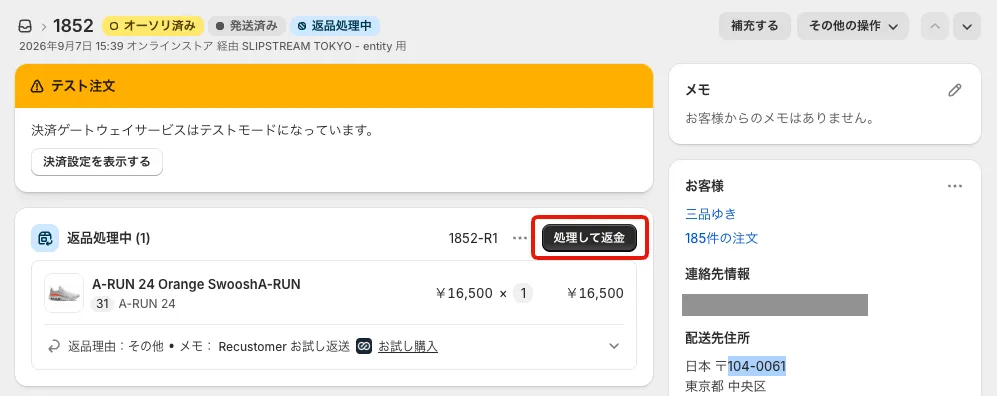
Taking payment: capturing the payment from the Shopify order detail screen (outlined in red)
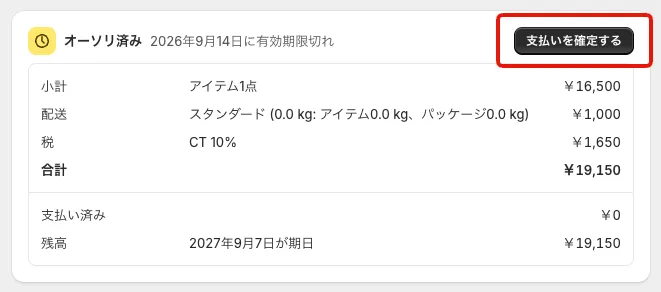
Issuing a refund: refunding from the Shopify order detail screen (outlined in red)
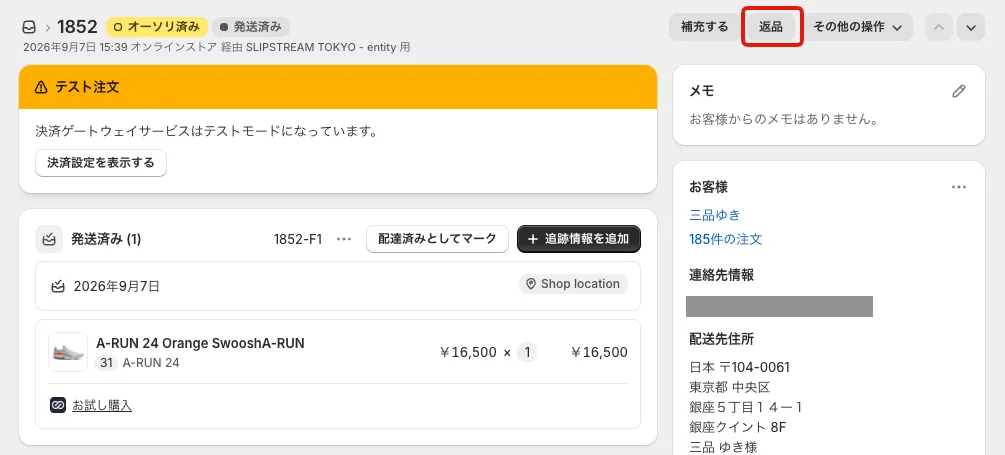
Creating a return: creating a return from the Shopify order detail screen (outlined in red)
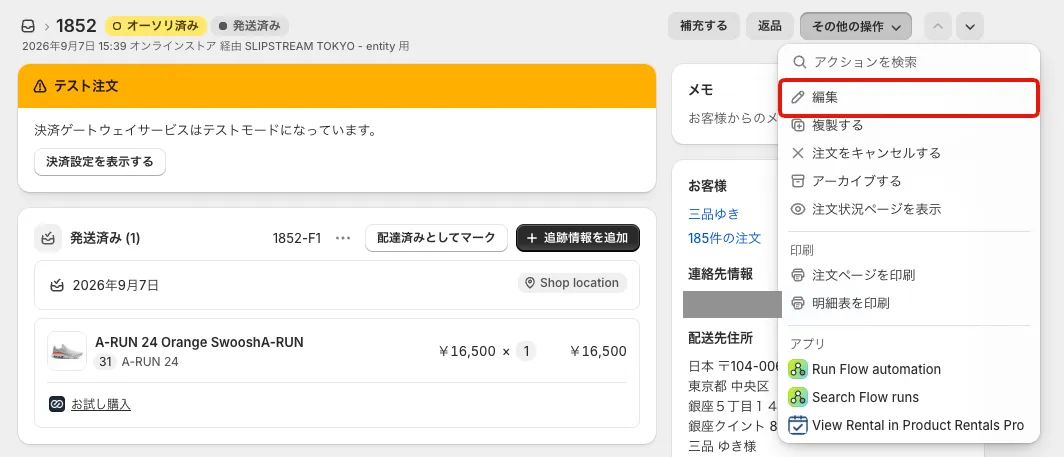
Removing or adding items on an order: editing the order in Shopify to remove or add items. This includes items added by external apps and trial items being removed
A shopper wants to change their order before it ships. Can I edit the order in Shopify?
No, do not edit it.
On a trial order, anything that changes the amount from what it was at the time of the order — changing quantities, adding or removing items, adding a discount — can break the payment confirmation and lead to errors or a charge for the wrong amount (see Things to be careful about while running Try Before You Buy).
If the order needs to change, ask the shopper to cancel it and place a new one with the correct contents.
I want to cancel a return request for a trial item, or switch between return and exchange
On return requests for trial items, "Remove item" and "Change the resolution", which are available on regular return requests, cannot be used.
Handle each case as follows.
Cancelling a return request so the item is charged in full again
Open the return request and choose Mark as past the return deadline
Specify the quantity. If you do not want to email the shopper, clear the Notify the customer checkbox
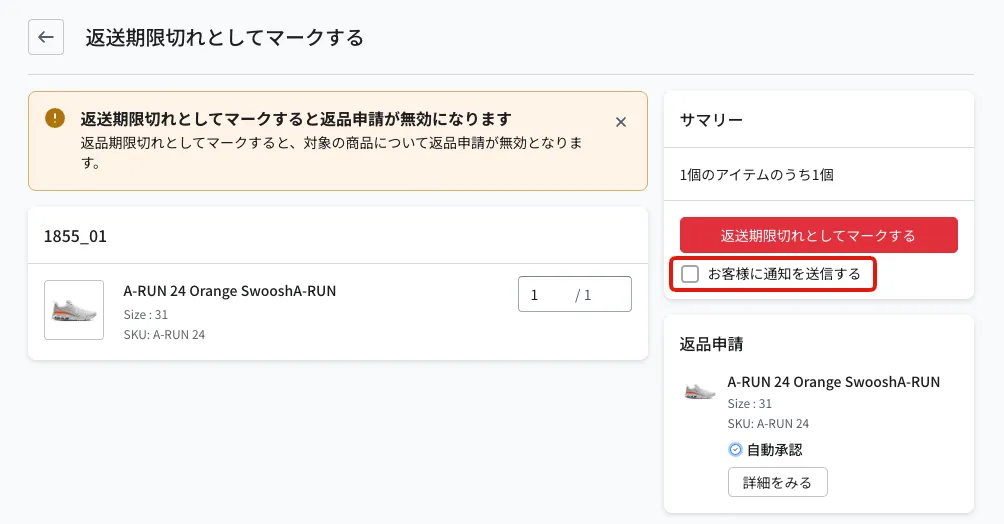
Click the Mark as past the return deadline button
Items marked as past the return deadline are included in the capture (payment confirmation), and Recustomer confirms the payment automatically. Nothing needs to be done on the Shopify side.
Changing an exchange request into a return
The resolution cannot be changed, so process the request as it was created.
- Handle the approval and the return as usual, and mark the items as received when they arrive back
- Do not ship the exchange items; it is fine to leave them unfulfilled as far as the Recustomer status is concerned
- After the trial period ends and payment is confirmed, refund the necessary amount on the Shopify side
Changing a return request into an exchange
Marking a return request as received deducts the amount of that item from the payment. To handle it as an exchange, keep charging for the original item and ship the exchange item separately.
Open the return request and run Mark as past the return deadline (if you do not want to email the shopper, clear the Notify the customer checkbox). This puts the original item back into the payment confirmation after the trial period ends
Once you have received the returned item, ship the exchange item from Shopify. The exchange item is covered by the payment on the original order, so no additional charge is needed
If the exchange item costs a different amount than the original, refund or charge the difference on the Shopify side after payment is confirmed
What should I do when an order whose payment was confirmed after a re-authorization failure has a return?
It has to be handled manually.
When a re-authorization (obtaining a new credit hold) fails during the trial period, payment is confirmed using the hold already in place so that the payment is not lost (see If it fails between the order and the end of the trial). If such an order then has a return, it is not like a normal trial return: it has to be handled manually.
- Handle the approval and the return on the return request as usual, and mark the returned items as received
- Issue the refund in the Shopify admin.
- Close the Shopify return with "Close return". When payment was forced through, the Shopify return status does not complete automatically. Nothing further is needed on the Recustomer side
Whether a refund is needed can only be seen on the return request detail screen
If the payment was forced through after the return request was received, an alert about the refund being needed is shown in the "Order" section of that return request's detail screen. This alert is not shown in the return request list, so we recommend opening trial return requests in detail to check.
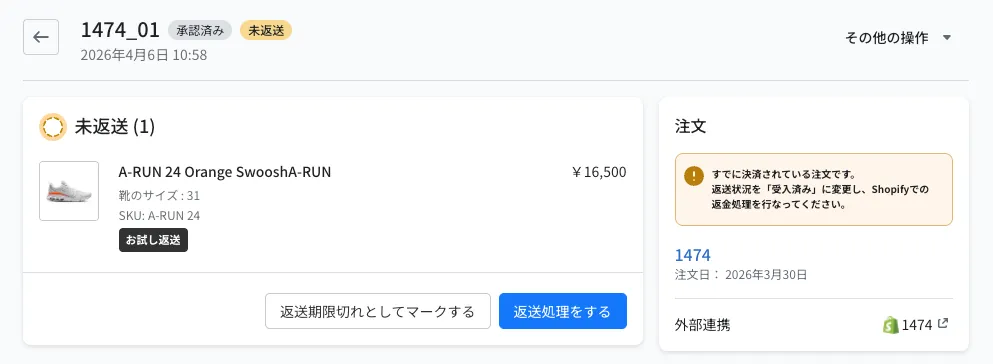
Also, because the trial period is treated as finished (the purchase confirmed) once payment is forced through, no reminder email is sent as the deadline approaches. The shopper does receive the "re-authorization failed" email, so including a line such as "if you would like to return an item, please follow the usual return process" and the URL of the return request page in that email reduces enquiries (see Notification emails).
What happens to the payment if I reject an item or mark it as past the return deadline?
Items you reject and items you mark as past the return deadline both go back into the payment confirmation.
Items that were treated as "due to be returned, so not charged" when the trial return was requested switch to being charged once they are rejected or marked as past the return deadline, and payment is taken after the trial period ends (or after the number of days set in the capture settings).