Sending back and pickups
Pickups and drop-offs
- Does the shopper need to prepare a shipping label?
- How shoppers pay when Sagawa pickup is shopper-paid
- How shoppers pay when Yamato drop-off is shopper-paid
- What is the approximate Sagawa pickup fee?
- A shopper asks about an unfamiliar charge or receipt from Recustomer
- What should the shopper do to cancel a pickup or drop-off?
- A shopper says the pickup did not come
- The shopper cannot get past the Sagawa pickup request page
- Can several items be sent back together in one box?
- How long is the Yamato drop-off QR code valid?
Return reminder emails
Does the shopper need to prepare a shipping label?
The shopper does not need to prepare a shipping label for any return method. Just ask them to pack the items.
- Sagawa pickup: The driver who comes to pick up the parcel brings a label printed with the required information
- Yamato drop-off (convenience stores and Nekopit): The label is issued at the store from the QR code shown on the return request completion page
How shoppers pay when Sagawa pickup is shopper-paid
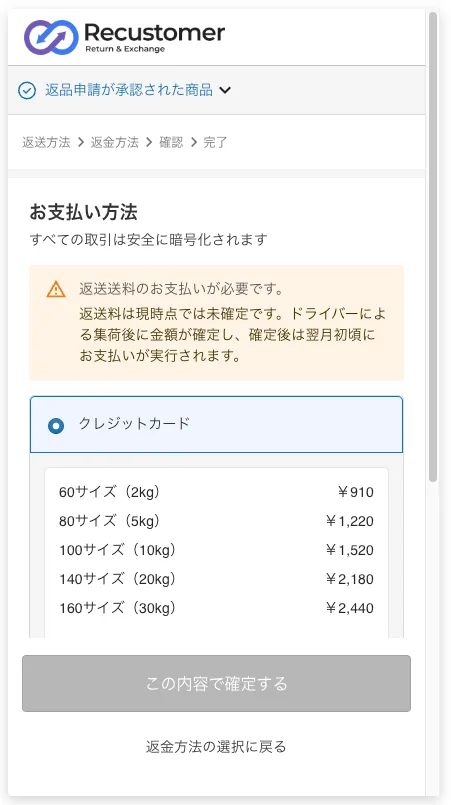
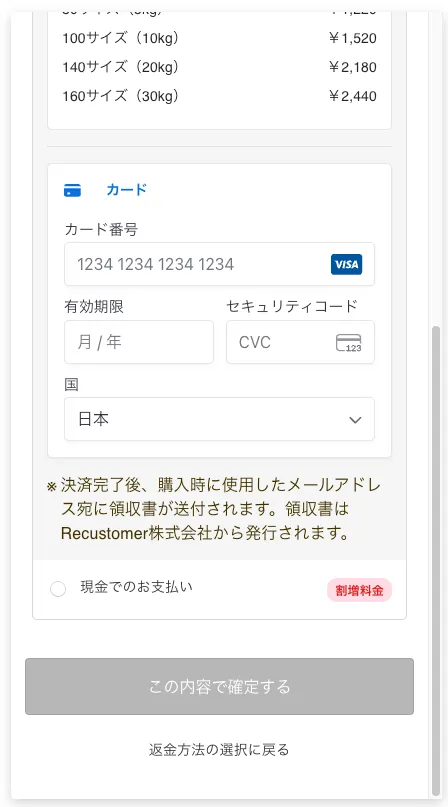
After choosing the return method, the shopper sees a payment method page and chooses "Credit card" or "Cash payment".
| Payment method | Description |
|---|---|
| Credit card | The shopper registers card details on the return and exchange request page (the card used for the order is not used). The fee is not determined at the time of the request; it is finalized by the actual size after the driver picks up the parcel, and charged around the beginning of the following month. When it is charged, a receipt email from Recustomer Inc. is sent to the email address used for the purchase. Sagawa's standard published rate applies, and the fees by size are shown when the card option is selected |
| Cash payment | The shopper pays the driver in cash at pickup. Sagawa's standard published rate applies |
※Registering card details does not charge the card. Only parcels that Sagawa actually picks up are charged. Even if the shopper re-enters card details during the process or redoes the request, nothing is charged for pickups that did not happen
How shoppers pay when Yamato drop-off is shopper-paid
Credit card is the only payment method. Cash payment, which is available for Sagawa pickup, cannot be selected.
After choosing the return method, the shopper sees a payment method page and registers card details on the return and exchange request page (the card used for the order is not used). The page shows the fees by size. Yamato's standard rate applies.
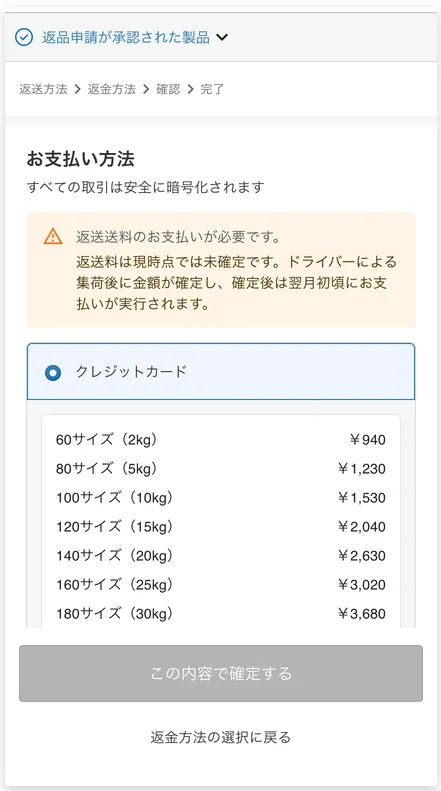
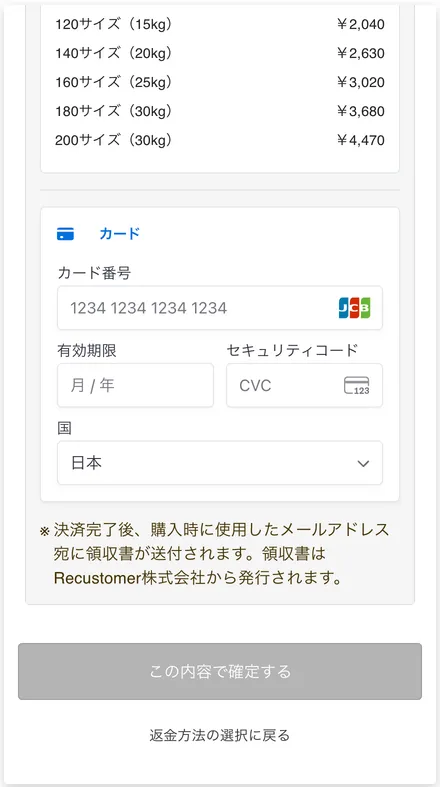
The fee is not determined at the time of the request. It is finalized by the actual size of the parcel that was dropped off, and charged around the middle of the month after use. When it is charged, a receipt email from Recustomer Inc. is sent to the email address used for the purchase.
The shopper does not pay the return shipping fee at the convenience store or Yamato office counter.
Only parcels that are actually handed over to Yamato are charged. Registering card details does not charge the card.
If items from several return requests are packed together in one box, only that one parcel is charged. Even if the shopper registers card details for each request, or scans several QR codes at the store and issues tracking numbers, nothing is charged for tracking numbers that are not used on a parcel (→ Can several items be sent back together in one box?).
What is the approximate Sagawa pickup fee?
When the shopper pays (prepaid), the fee is Sagawa's standard published rate. It depends on the pickup and return regions and the parcel size, and you can check it with Sagawa's fare calculator.
When the shopper chooses card payment, the fees by region and size are also shown on the return and exchange request page.
※The amount is finalized by the size Sagawa measures after pickup
A shopper asks about an unfamiliar charge or receipt from Recustomer
This is the charge and receipt for the return shipping fee, sent when the shopper pays for Sagawa pickup or Yamato drop-off (shopper-paid).
When the shopper pays the return shipping fee by credit card, Recustomer pays it in advance and charges the shopper later. So the card statement and receipt are in the name of "Recustomer", not the store. The receipt is sent from Recustomer Inc. to the email address used for the purchase.
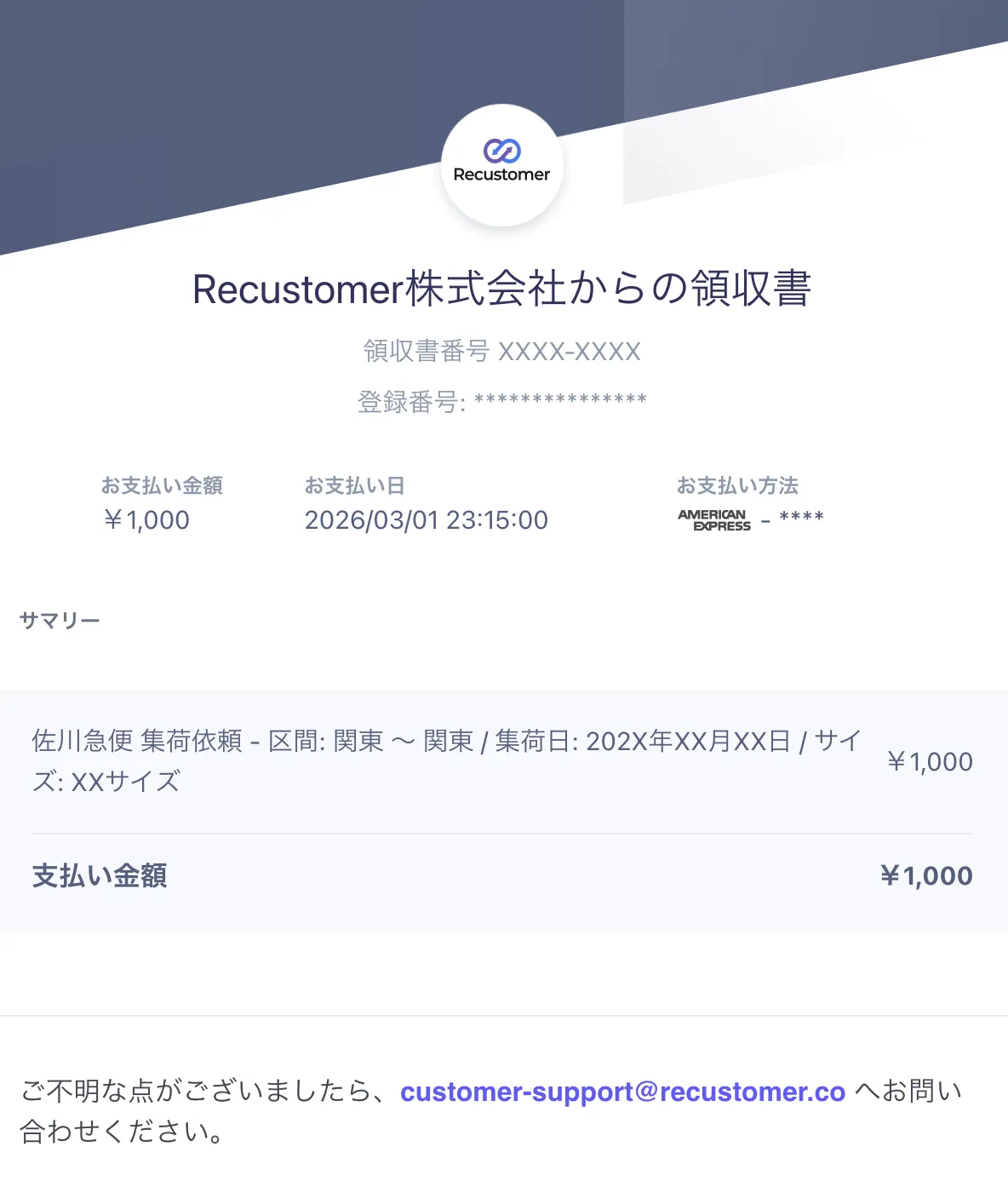
When the charge is made depends on the return method.
- Sagawa (pickup): at the beginning of the month after use
- Yamato (drop-off): around the middle of the month after use
※If the shopper sent items back several times in a month, each pickup or drop-off is charged separately, so several charges appear on the same day
The gap between the date of use and the charge, and the different billing name, can make the charge look unfamiliar. If the shopper wants details, refer them to Recustomer customer support (customer-support@recustomer.co).
What should the shopper do to cancel a pickup or drop-off?
It depends on the return method.
| Return method | How to cancel |
|---|---|
| Sagawa pickup | Find the nearest Sagawa branch to the pickup address with Sagawa's branch search, call it, give the tracking number (送り状 No.), and ask to cancel. The tracking number is in the notification email sent when the return request was confirmed. No return shipping fee is charged for a cancelled pickup |
| Yamato drop-off | Nothing needs to be done. If the parcel is not dropped off, no return shipping fee is charged |
A shopper says the pickup did not come
Open the return request in Return management, click "View details", and check "Pickup request date and time" and "Tracking number".
| "Pickup request date and time" | Situation and what to do |
|---|---|
| Shown | The pickup has been requested. Ask the shopper to contact the Sagawa branch nearest to the pickup address and give the tracking number (送り状 No.) |
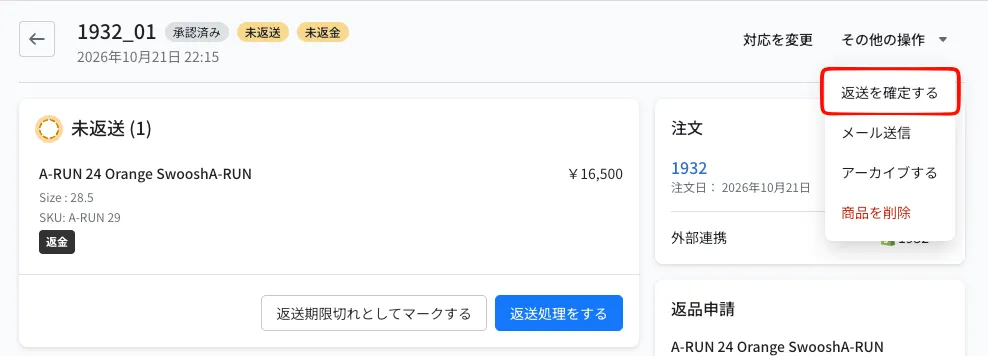
| Not shown | The shopper did not finish the steps. Ask them to start again from "手続きに進む" (proceed) in the email sent at approval (→ Can I resend a notification email that was sent?). You can also register the pickup request from "Confirm sendback" in "Other actions" |
The shopper cannot get past the Sagawa pickup request page
If any field has a problem, the "返送方法を確定して次に進む" (confirm the return method and continue) button cannot be clicked. The field with the problem shows an error in red below it, so please check with the shopper that each field meets the following conditions.
| Field | Condition | Main error shown |
|---|---|---|
| Name | Up to 16 characters. No space, including between the last and first name | Please do not include spaces |
| Postal code | 7 half-width digits (no hyphen). Choosing one of the address suggestions that appear fills in the prefecture and city | Address not found |
| Street address / Building | Up to 16 full-width characters. Numbers and hyphens in the street number must also be full-width | Please enter in full-width characters |
| Phone number | 10 or 11 half-width digits (no hyphen) | Enter a 10–11 digit phone number |
If the shopper cannot enter the details, choose "Confirm sendback" from "Other actions" at the top right of the return details page to enter the pickup date, time and address in the admin on their behalf.
Can several items be sent back together in one box?
Yes. Items from different return requests can be packed together. Guide the shopper as follows depending on the return method.
- Yamato drop-off: Send the parcel using the QR code of any one of the requests. QR codes that are not used can simply be discarded
- Sagawa pickup: Send everything with one of the labels, and tell the driver who comes for the pickup that the other pickup is no longer needed so it is cancelled
How long is the Yamato drop-off QR code valid?
It is valid for 30 days from issue and can be used only once.
How many times are return reminder emails sent? Can I change the number?
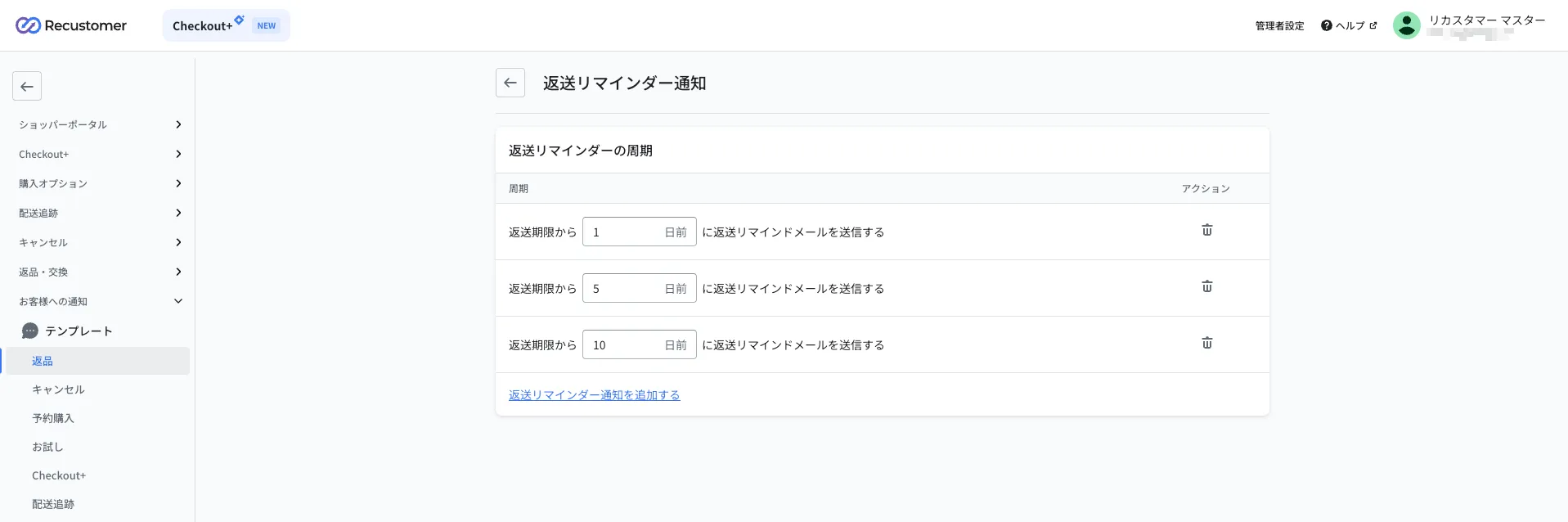
One email is sent for each day registered in the return reminder settings. For example, if you have registered "1 day before", "5 days before", and "10 days before" the send back deadline, up to 3 emails are sent.
You can change when and how many times they are sent from "Configure send-back reminder notifications" under "Reminder for items awaiting return" in Settings > Notifications to shoppers > Templates > Returns. Add a day with "Add return reminder notification" and remove one with the trash icon. You can register from 1 to 30 days before the deadline.
※You cannot set a different number of emails for each customer
※Requests that are already accepted or archived do not receive the email
Return reminder emails are sent to customers who have already sent the items back
Return reminder emails are sent for approved requests whose send back status is "Not returned" (including "Partially not returned"). Even if the shopper has already shipped the items, the status stays "Not returned" until you change it to "Accepted" in Recustomer, so the reminder email is still sent.
You cannot stop reminder emails for a specific customer or order.
So that shoppers are not confused when the email crosses with their shipment, we recommend adding a sentence like the following to the "Reminder for items awaiting return" template (→ Editing the templates).
Example:
This email is sent automatically by our system.
It may also reach customers who have already sent their items back.
If so, please disregard this email.