SUPPORT
Return management
How do I find a return by scanning the barcode on the shipping label?
You can find the return request by reading the barcode on the shipping label of the returned parcel. Connect a barcode reader to your PC. You can also use a smartphone if it has an app that types the scanned barcode in as text.
- In Return management, click Other actions at the top right and select Scan shipping barcode
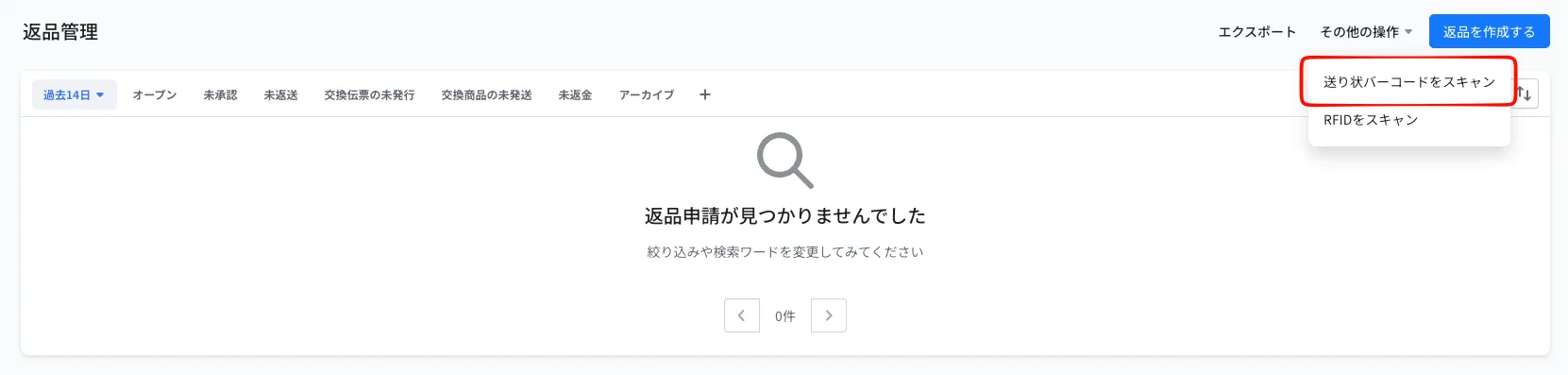
- On the screen that opens, choose how to read the barcodes
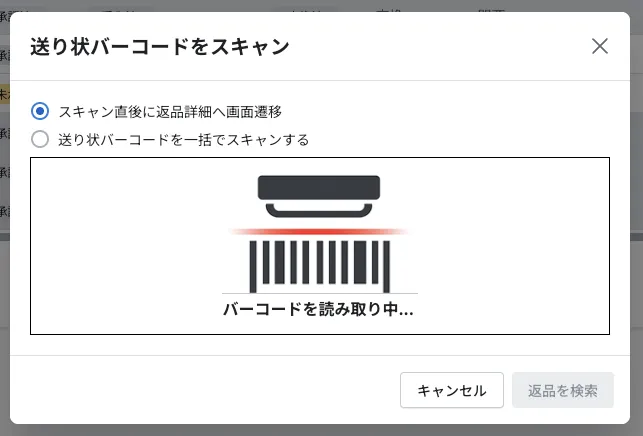
| Option | What happens |
|---|---|
| Go to return details immediately after scan | Opens the details of the return each time you read a barcode |
| Scan shipping barcodes in bulk | Collects the label numbers you read. When you click Search returns, the current view is narrowed down to those returns |
- With this screen open, read the barcode on the shipping label
※Only returns with a registered return tracking number can be found. If none is found, "Failed to retrieve data" is shown when you go to the return details right after scanning, and the search returns no results when you scan in bulk
© Recustomer, Inc.