How to find the payment method key
How you find the payment method key depends on the cart system or OMS you have connected. See the section for the service you use.
Shopify
Register the keys as shown in the mapping table below.
Important
The keys are matched exactly, including the single-byte spaces inside them. We recommend copying the key from the table and pasting it as is (for example,
楽天ペイ Sbpscontains three spaces).Payment method names and keys are shown here in Japanese because that is how they appear in the order data. Enter them exactly as shown, without translating them.
| Payment method | Key to enter |
|---|---|
| Shopify Payments | Shopify Payments |
| shop pay | Shopify Payments |
| Apple pay | Shopify Payments |
| Google pay | Shopify Payments |
| Amazon Pay | Amazon Pay |
| Pay Pal | Pay Pal Express Checkout |
| Cash on delivery, etc. | Cash On Delivery (Cod) |
| Manual payment | Manual |
| Credit card (3-D Secure) - SBPS | クレジットカード決済(3 Dセキュア) Sbpsクレジットカード決済(3Dセキュア) - SBPS※The value depends on your configuration, so we recommend registering both |
| Rakuten Pay - SBPS | 楽天ペイ Sbps |
| Rakuten Pay (V2) - SBPS | 楽天ペイ(V2) Sbps |
| PayPay (online payment) - SBPS | Pay Pay(オンライン決済) Sbps |
| SB Payment convenience store payment | コンビニ決済 Sbps |
| au Kantan Kessai - SBPS | Auかんたん決済 Sbps |
| au PAY - SBPS | Au Pay Sbps |
| d Payment - SBPS | D払い Sbps |
| SoftBank Matomete Shiharai - SBPS | ソフトバンクまとめて支払い Sbps |
| KOMOJU - Credit Card | Komoju クレジットカード決済 (Credit Card) |
| KOMOJU - Rakuten Pay | Komoju 楽天ペイ (Rakuten Pay) |
| KOMOJU - Merpay | Komoju Merpay |
| KOMOJU - au PAY | Komoju Au Pay |
| KOMOJU - PayPay | Komoju Pay Pay |
| KOMOJU - d Payment | Komoju D払い |
| KOMOJU - Paidy | Komoju Paidy |
| KOMOJU - Convenience Store | Komoju コンビニ決済 (Convenience Store) |
| KOMOJU - Smartphone Payments | Komoju スマホ決済 (Smartphone Payments) |
| KOMOJU - Pay-easy | Komoju ペイジー決済 (Pay Easy) |
| Epos Kantan Kessai - KOMOJU | Eposかんたん決済 Komoju |
| Paidy (deferred payment) | あと払い(ペイディ) |
| Paidy (deferred, 27th of next month, convenience store / bank) | あと払い(ペイディ) 翌月27日払い(コンビニ/銀行) |
| atone | Atone つど後払い(コンビニ/銀行atm) |
| atone (pay per order, convenience store / bank ATM) | Atone つど後払い(コンビニ/銀行atm) |
| atone (next month, convenience store / direct debit) | Atone 翌月払い(コンビニ/口座振替) |
| NP deferred payment (convenience store / post office / bank / LINE Pay, etc.) | Np後払い(コンビニ/郵便局/銀行/Line Pay等) |
| NP invoice payment (for businesses) | Np掛け払い(法人向け請求書払い) |
| Atobarai.com | 後払いドットコム |
| d Payment - DOCOMO Digital | d払いードコモデジタル |
| Paygent | ペイジェント |
| PG Multi-Payment Service | クレジットカード決済(Pgマルチペイメントサービス) |
| Smartpay | クレカ/銀行口座から無料3回払い (Smartpay) |
If you use a payment method that is not listed above, please contact your customer success representative.
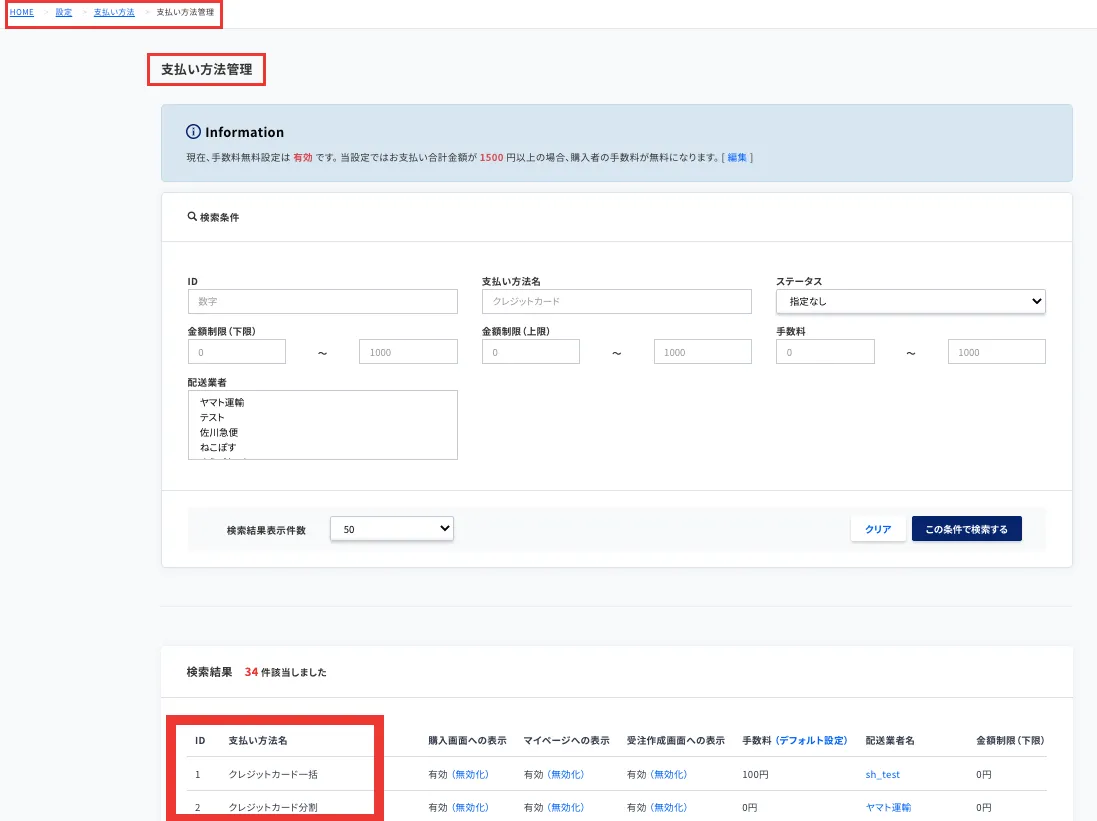
ecforce
You can find the payment method key at ecforce > Change settings > Payment methods > Manage payment methods > Configure.
Enter the ecforce payment method name in both the Recustomer "payment method name" and "payment method (Key)" fields.
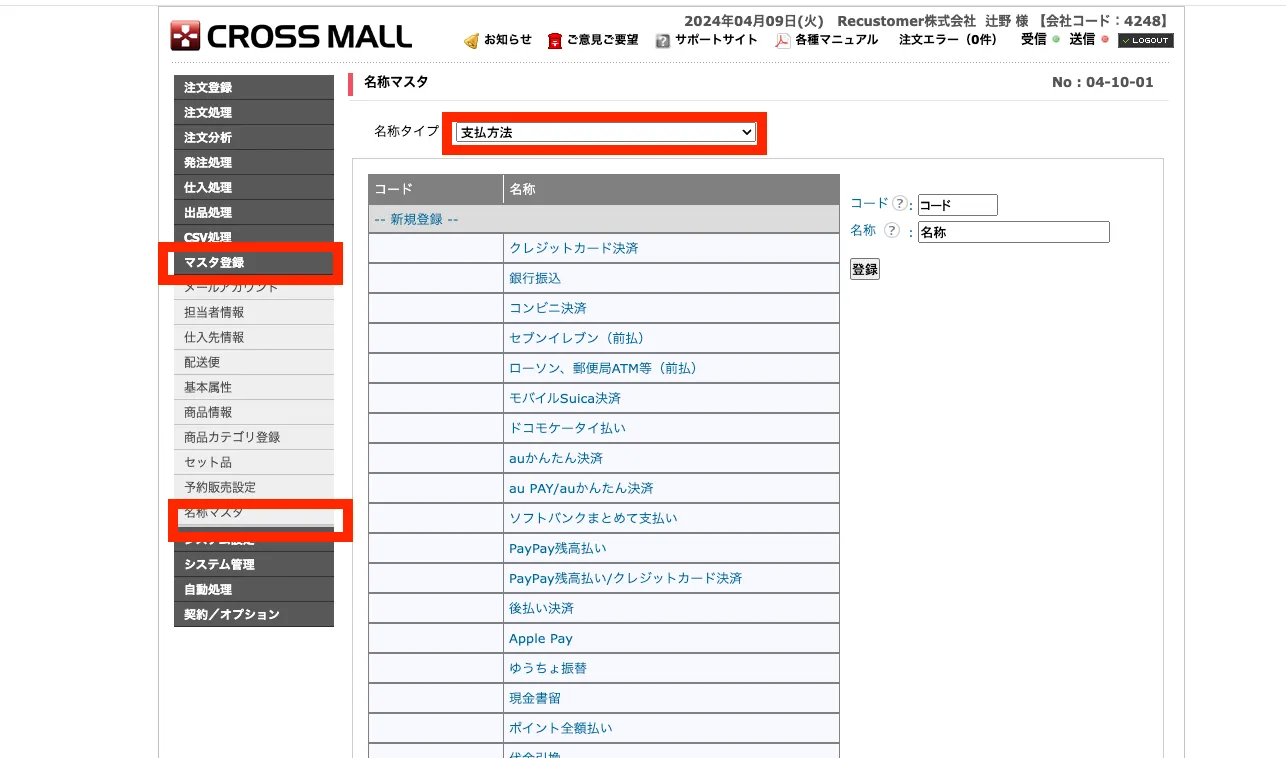
CROSSMALL
Open the CROSSMALL admin and select Master registration > Name master. The name is the key.
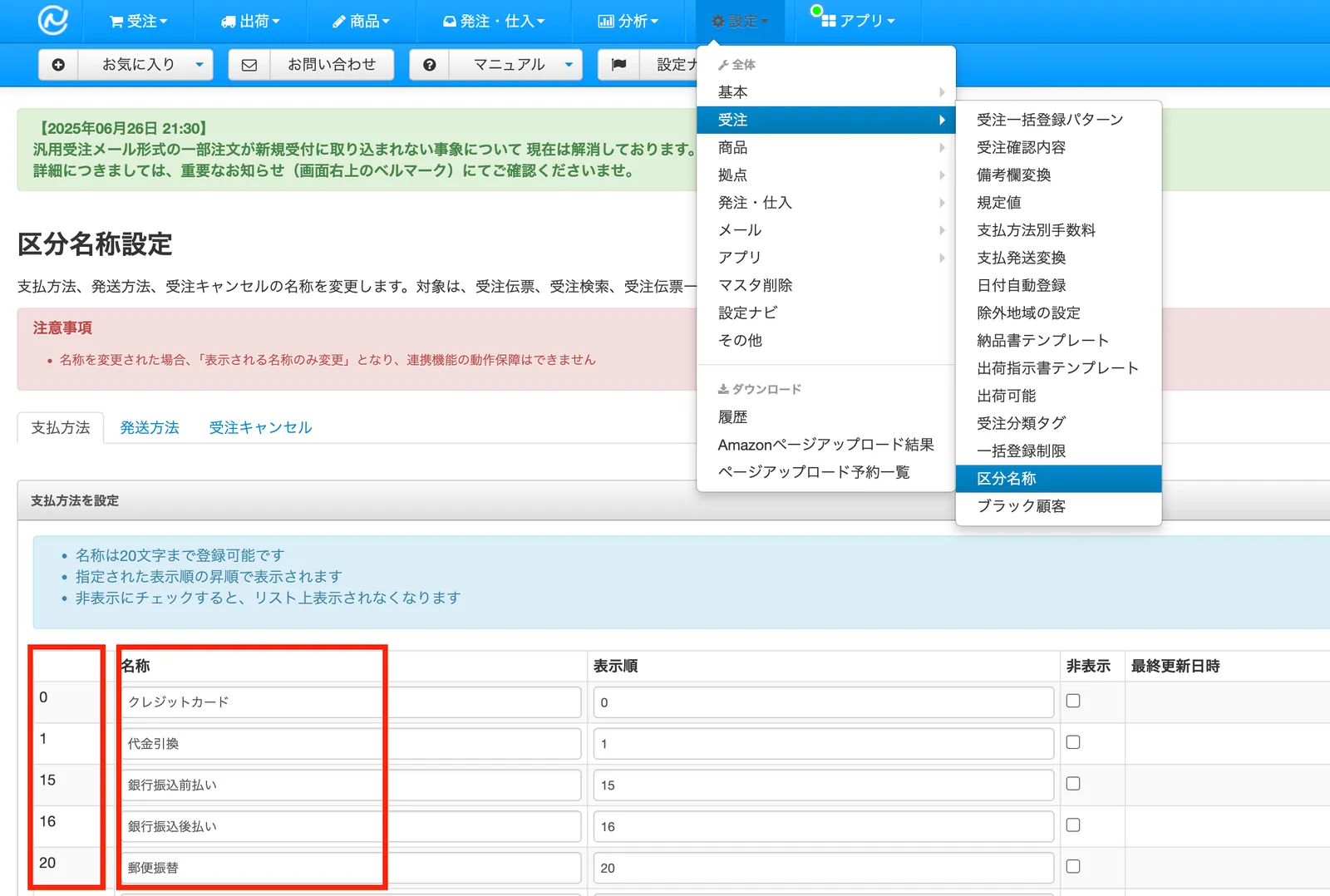
NextEngine
You can find the payment method key at NextEngine > Settings > Orders > Category names > Payment methods.
Enter the NextEngine name in the Recustomer "payment method name" field, and the number in the leftmost column in the Recustomer "payment method (Key)" field.
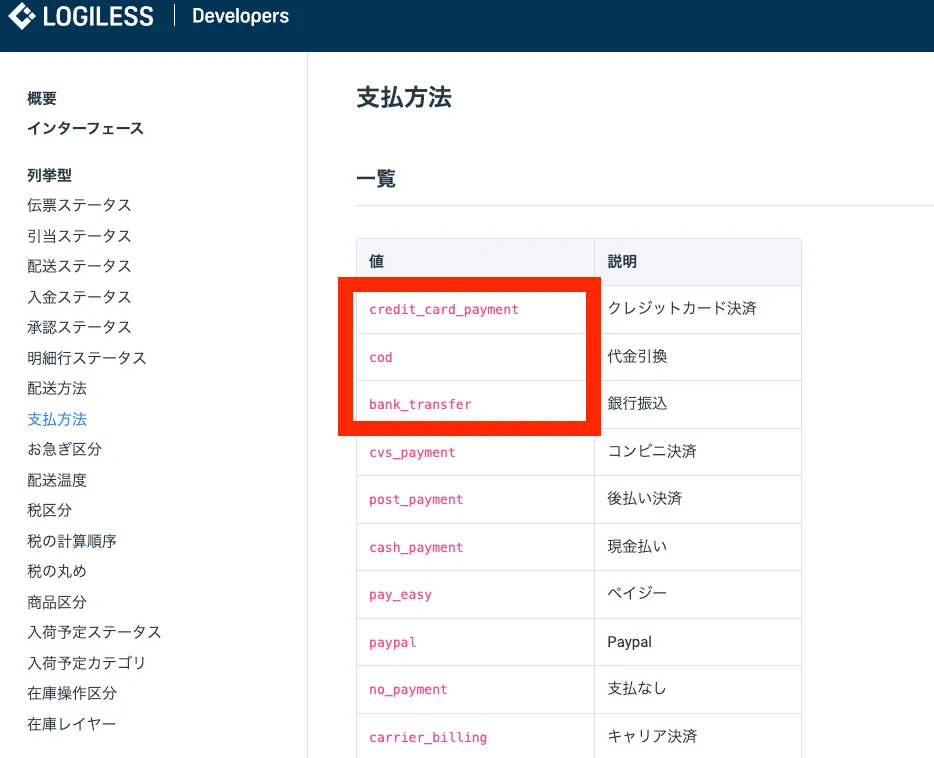
LOGILESS
The LOGILESS documentation below lists the payment methods. The value column is the key.
https://app2.logiless.com/developer/documents/type/payment_method