Troubleshooting
Frequently asked questions
What search and filter options are available in Delivery management?
How do carrier statuses map to Recustomer delivery statuses?
The carrier shows as "others" and the shipment is not tracked
How do I read the tracking screen?
Open Delivery management (配送管理) in the left menu of the admin dashboard to see the list of imported shipments. Each shipment is one row, showing the tracking number, order number, customer, items, delivery status, carrier, shipping date, estimated delivery date, delivery completion date, and destination (postal code and prefecture).
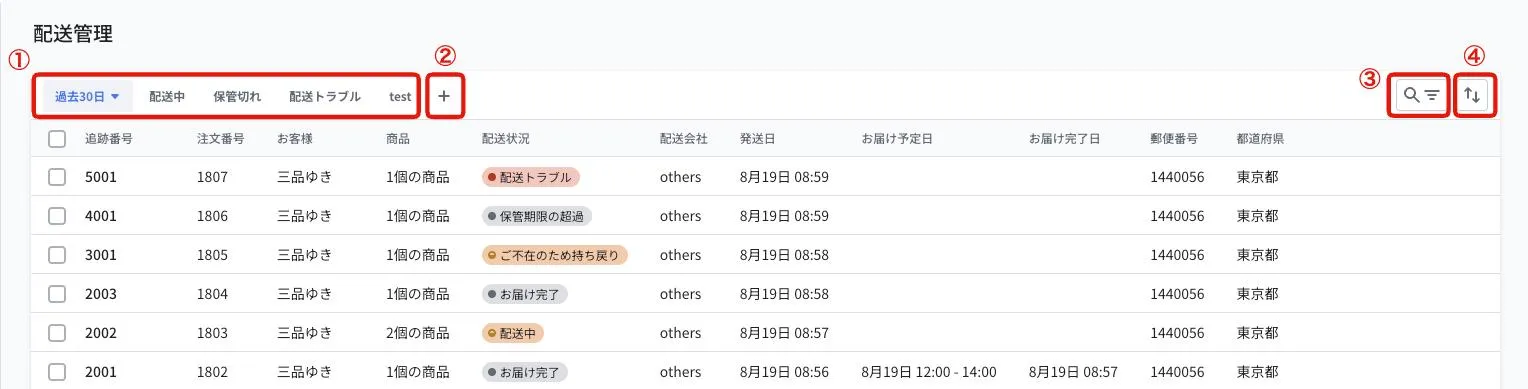
1. Views: filter the list by delivery status, such as "in transit", "storage expired", or "delivery trouble". The dropdown at the left end changes the displayed period (such as the last 30 days)
2. Add views: save your own filter conditions as additional views
3. Search and filters: search by tracking number or order number, or filter by conditions
4. Sorting: change the display order of the list
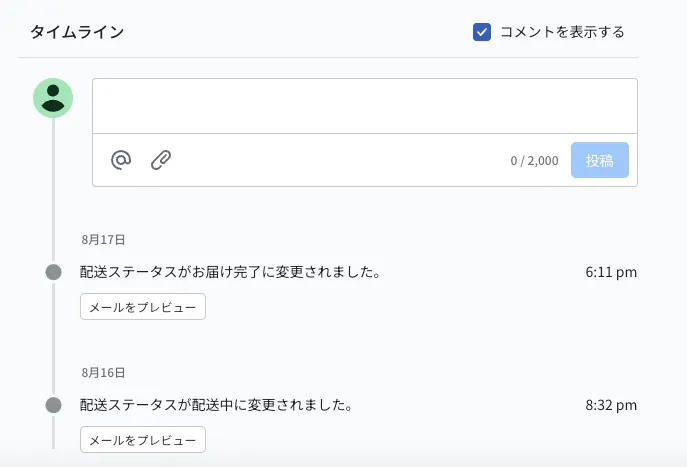
Click a shipment to open its details, where the timeline shows the history of delivery status changes and which shipping notification emails were sent and when.
What search and filter options are available in Delivery management?
The delivery management list supports the following search, filter, and sort options.
※There is no export feature for the list
| Type | Description |
|---|---|
| Search | Search by tracking number or order number. Matches from the beginning (prefix match) |
| Period | Filter by shipping date (last 30 days, last 90 days, or a custom range). The selectable range is up to 90 days |
| Delivery status | Filter by multiple selections from: delivery requested, package accepted, in transit, ready for pickup, delivered, returned to carrier (missed delivery), delivery trouble, storage expired |
| Sorting | Sort by order number, tracking number, or shipping date, ascending or descending |
When are shipping notification emails sent?
Recustomer checks the carriers' tracking information 7 times a day (every 2 hours between 10:00 and 22:00) and sends the corresponding notification email when it detects a change in the delivery status. See How do carrier statuses map to Recustomer delivery statuses? for which carrier status corresponds to which delivery status.
Each email is sent only once, when the delivery status changes (nothing is sent while the status stays the same)
Only the notifications turned on in 2-5. Notification emails are sent
Tracking and notification emails run for 21 days from the shipping date (they end when the shipment is delivered or its storage period expires)
Only the redelivery reminder is sent on a different schedule
It is sent at around 12:00 on the day the configured number of days (1–10) has passed since the missed delivery was detected
It is not sent if the package has been received by then
※It is sent only if Settings > Customer notifications > Templates > Tracking > Redelivery reminder > Reminder notification settings is configured
How do carrier statuses map to Recustomer delivery statuses?
The statuses shown on the carriers' tracking pages are converted to Recustomer delivery statuses as follows.
| Recustomer delivery status | Yamato Transport | Sagawa Express | Japan Post | DHL |
|---|---|---|---|---|
| 荷物受付け | 荷物受付 | 集荷/お申込 | 引受 | Shipment pick up/Shipment acceptance |
| 配送中 | 発送済み/作業店通過/配達中 | 輸送中/配達中/保管中 | 到着/持ち出し中/転送 | Arrived facility/Depart facility/With delivering courier etc. |
| 受取可能 | コンビニエンスストア等に引渡 | コンビニエンスストア等に引渡 | コンビニエンスストア等に引渡 | Awaiting cnee collection |
| お届け完了 | 配達完了/投函完了/お客様引渡完了 | 配達完了/引渡完了 | お届け先にお届け済み/窓口でお渡し | Delivery/Closed shipment |
| ご不在のため持ち戻り | 持戻(ご不在)など「持戻(〜)」各種 | ご不在/宅配BOX利用不可/ロッカー空き無し | 持戻/ご不在のため持ち戻り/配達局で保留 | Not home/Not delivered/Missed delivery cycle |
| 配送トラブル | 調査中/遅延中/発送中止 | 調査中/営業所へお問い合わせ下さい | 調査中/返送できません | Bad address/Refused delivery/Returned to consignor etc. |
| 保管期限の超過 | 返品(持戻保管中)/返品完了 | 返品/営業所保管中 | 保管期限が超過しましたので返送致しました/差出人に返送 | − |
※Recustomer delivery statuses and carrier statuses are shown in Japanese, as they appear in the admin dashboard and on the carriers' tracking pages.
The carrier shows as "others" and the shipment is not tracked
Shipments whose carrier could not be identified are imported as "others" and are excluded from tracking.
Check the following.
The carrier is registered in the order's fulfillment information
The tracking number is registered correctly (even with the correct carrier, the shipment becomes "others" if the number of digits does not match the carrier's format)
If you use CROSSMALL: the carrier mapping is configured
If you use ecforce: the carrier mapping is configured