Operational test
Once the setup is complete, run a tracking test using the dedicated test tracking numbers. You can check how the tracking page and the notification emails look without carrying out an actual delivery.
Test tracking numbers
Each test tracking number replays a fixed sequence of delivery statuses. Pick the number that matches what you want to check.
| Tracking number | Scenario | Tracking page | Notifications you can check |
|---|---|---|---|
| 2001 | Accepted → out for delivery → delivered | Shows the page in the "shipped" state | ・Package accepted ・Out for delivery ・Delivered |
| 2002 | Accepted → out for delivery | Shows the tracking page in the "in transit" state | ・Package accepted ・Out for delivery |
| 2003 | Accepted → out for delivery → ready for pickup → delivered | Shows the page in the "shipped" state | ・Package accepted ・Out for delivery ・Ready for pickup ・Delivered |
| 3001 | Accepted → out for delivery → missed delivery | Shows the page in the "missed delivery" state | ・Package accepted ・Out for delivery ・Missed delivery |
| 4001 | Accepted → out for delivery → missed delivery → storage expired | Shows the page in the "delivery failed (storage expired)" state | ・Package accepted ・Out for delivery ・Missed delivery ・Storage expired |
| 5001 | Delivery trouble | Shows the page in the "delivery trouble" state | ・Delivery trouble |
Test steps
Create a test order and mark it as fulfilled
When you do, set the carrier to "Other" (その他) and register one of the test tracking numbers above as the tracking number
Confirm that the test order appears in Delivery management
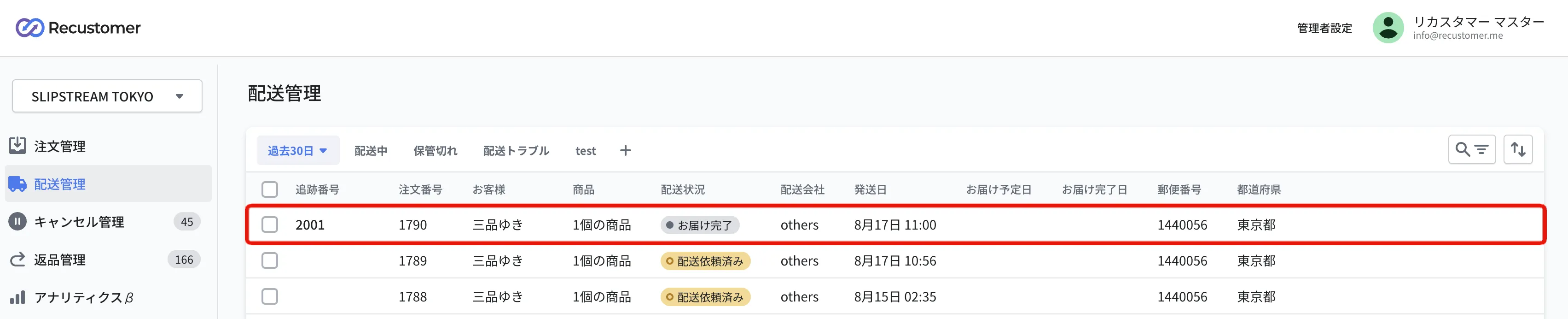
※There is a time lag before it appears (a few minutes for Shopify integration and CSV import, and up to about one hour for OMS integrations such as NextEngine and LOGILESS)
Confirm that the shipping notification emails matching the chosen test tracking number (the "Notifications you can check" column above) have arrived
※The notifications arrive together at almost the same time
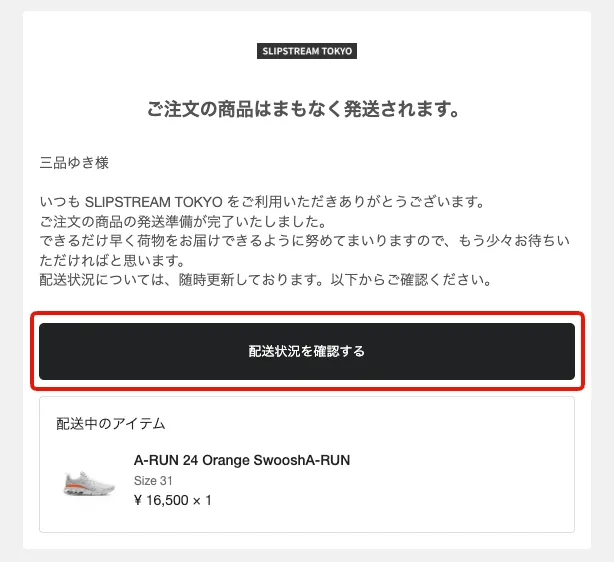
Click the "配送状況を確認する" (check delivery status) link in a shipping notification email and confirm that the delivery status is shown on the tracking page
Use a new test order to test again
Once a test order has been given a delivery status, it cannot be tested again, even if you replace its tracking number. To run another test, create a new test order.