STEP 2-1
Cancellation request page settings
Set the appearance and wording of the cancellation request page that shoppers actually use, to match your store.
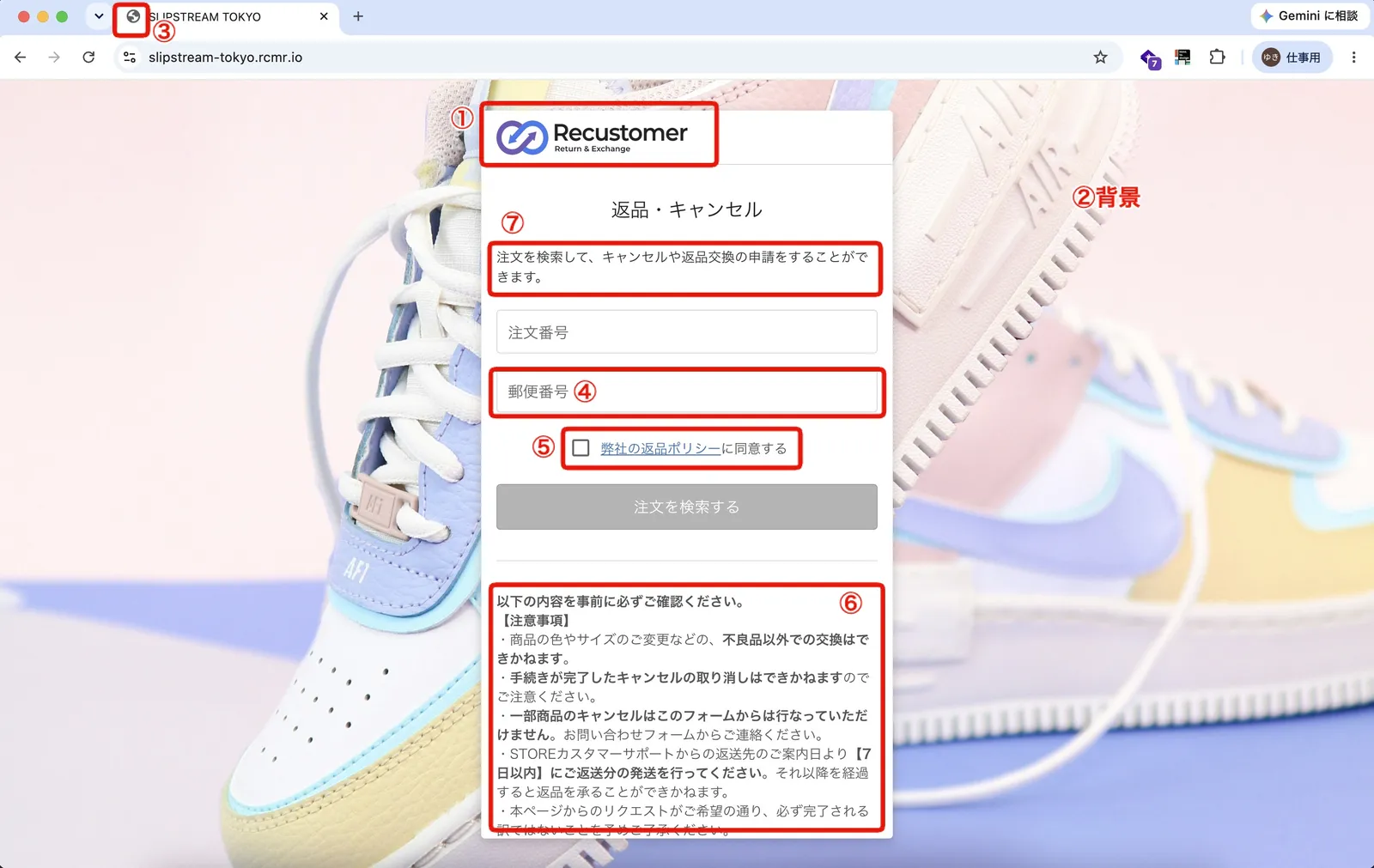
Items to configure
| Item | Where to configure it |
|---|---|
| ① Logo | Settings > Shopper portal > Customize > Branding |
| ② Background image | Settings > Shopper portal > Customize > Branding |
| ③ Favicon | Settings > Shopper portal > Customize > Branding |
| ④ Order lookup authentication method | Settings > Shopper portal > Return and cancellation requests > Order lookup authentication method |
| ⑤ Link target for "I agree to the return policy" | Settings > Shopper portal > Return and cancellation requests > Show consent checkbox |
| ⑥ Notes field | Settings > Shopper portal > Return and cancellation requests > Notes field at the bottom of the order lookup screen |
| ⑦ Wording | Settings > Shopper portal > Customize > Language editor |
You can check your changes by opening the actual request page. Find its URL at Settings > Shopper portal > Domain > Return and cancellation request page URL.
© Recustomer, Inc.